1 Description
[hide]
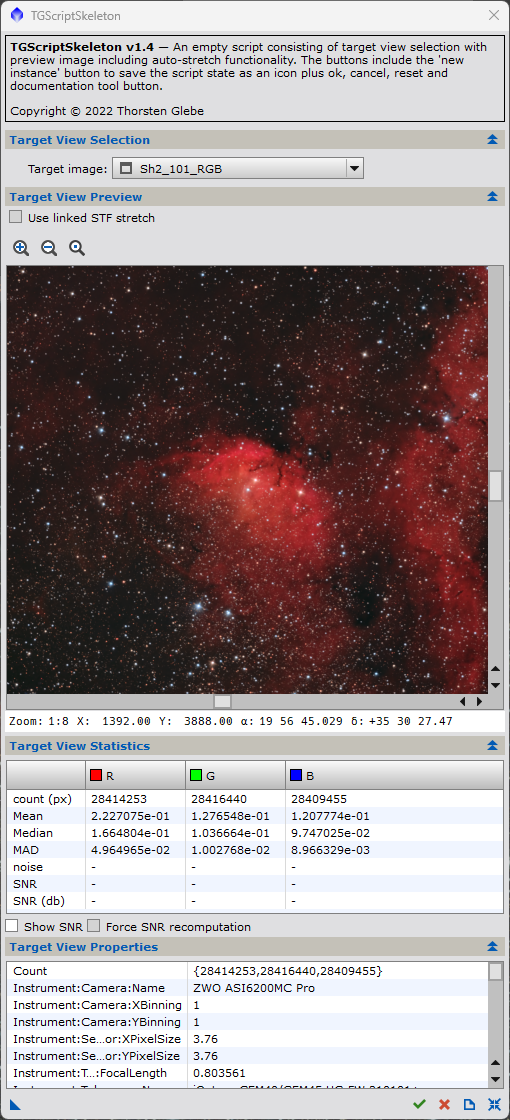
This script skeleton is a starting point for developing Pixinsight java scripts. It provides a simple list box for image selection with a preview of the selected image. The 'new instance' button allows to store the state of script parameters in a process icon. The 'Reset' button resets the GUI state to default, the documentation button shows this page and the usual 'Ok' and 'Cancel' buttons execute or exit the script.
2 Parameter Reference
[hide]
-
The target view selection control allows to choose a main view of an image (either grayscale or RGB) as a target for further processing. In case of linear images the script performs a stretch for display reasons. In case the image is already auto-stretched, the available STF settings are used. Otherwise an auto-stretch will be performed. In case of auto-stretch on a color image, the 'Use linked STF stretch' checkbox will be enabled to allow selecting a linked stretch. The unlinked stretch is the default.
-
The preview control is taken from the Pixinsight 'AnnotateImage' script and allows to zoom and scroll the image. In case the image is plate solved, the cursor on the image will show x and y coordinates in pixels and in RA and DEC coordinates in addition to the current zoom factor. The zoom factor can be adjusted using the scroll wheel on the mouse or the zoom bottoms above the image.
-
The target view statistics control shows some basic statistics of the chosen image. As image noise and SNR computation might be time consuming depending on the size of the image and the hardware used, SNR statistics is optionally and can be selected by the respective checkbox below. Per default the computed SNR is stored as a property in the image to avoid redundant expensive SNR computations. Thus the SNR values might become outdated in case images are altered. Therefore an additional checkbox allows to enforce the SNR recomputation.
Copyright © 2022 Dr. Thorsten Glebe